Every carrier bill read, checked and accounted for
Conduit AI reads your telecom bills, Conduit TEM catches the billing errors, and every dispute is followed until the credit shows up on a later bill.
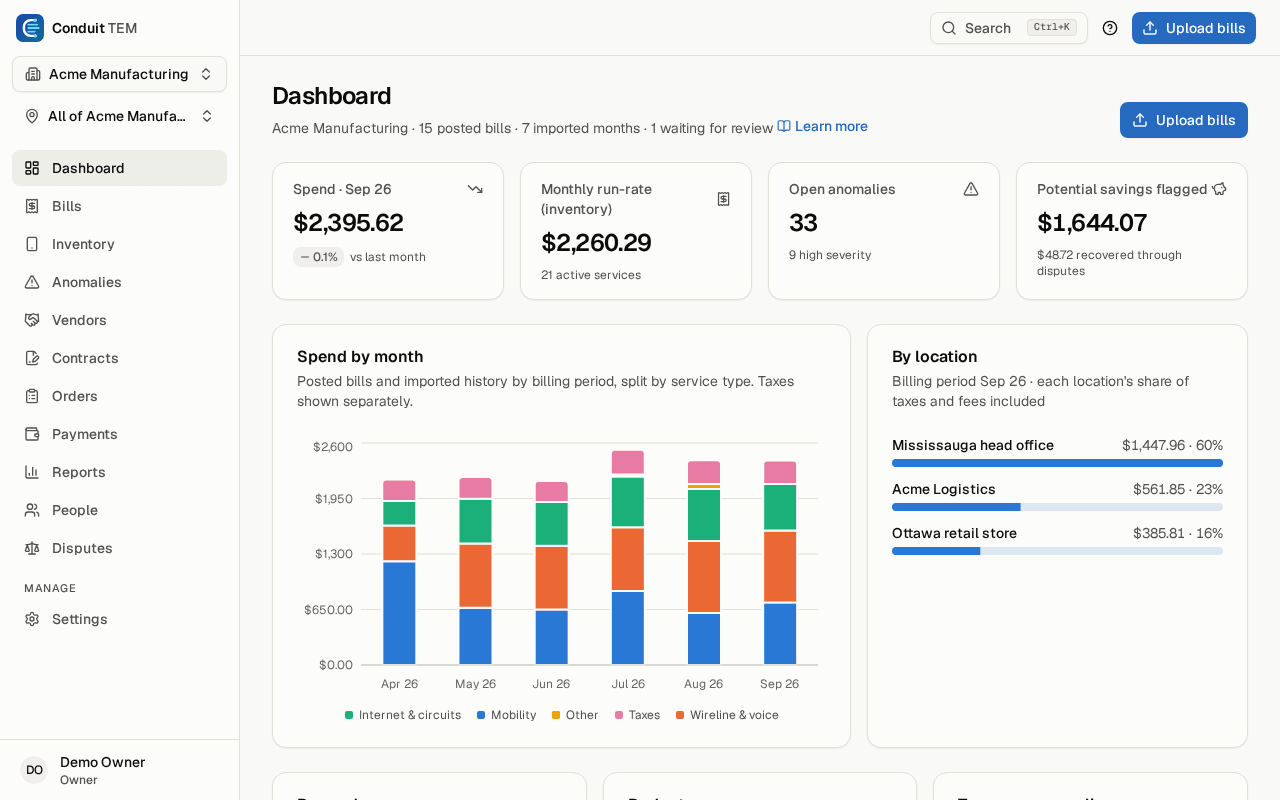
How it works
From the carrier's bill to money back
- Step 1
Bills come in
Forward them to your bill inbox or upload them: PDFs, photos of paper bills, or carrier portal spreadsheets.
- Step 2
Conduit AI reads them
Usually in under two minutes. Every line, seat, trunk and circuit lands in your inventory, in the right location.
- Step 3
Checks catch the errors
Fifteen checks run on every posted bill, from new and duplicate charges to lines still billed after a disconnect.
- Step 4
Disputes reach the credit
Ask the vendor for money back, and the next bill confirms the credit by itself.
What's inside
Everything after the bill arrives
Grouped the way our help centre is, so the answer to every question has a place.
- BillsRead by Conduit AI, by email or upload, in English or French.
- Ask Conduit AIQuestions about your bills and account, answered with the records behind them.
- Inventory and peopleEvery line you pay for, who uses it, where it is and what it costs.
- Findings and savingsBilling errors, disputes, contracts and the contract rate check.
- Requests & proposalsNew lines, upgrades and travel passes, and the proposals your account manager shares.
- Upgrades & renewalsLines due a new device, contracts ending soon, unused lines and high-usage alerts.
- Approvals and paymentsApproval flows, cover while away, and the hand-off to accounts payable.
- Accounting and budgetsGL coding, QuickBooks Online and Xero exports, and budgets.
- Reports and decksCustom and scheduled reports, and review decks that fill themselves in.
- AI spendAI tool seats and API usage beside your telecom spend, on the Business plan.
- Employee self-serviceEmployees see their own lines and costs, and ask for changes.
- SecurityFive roles, scopes by location, two-step verification and an activity log.
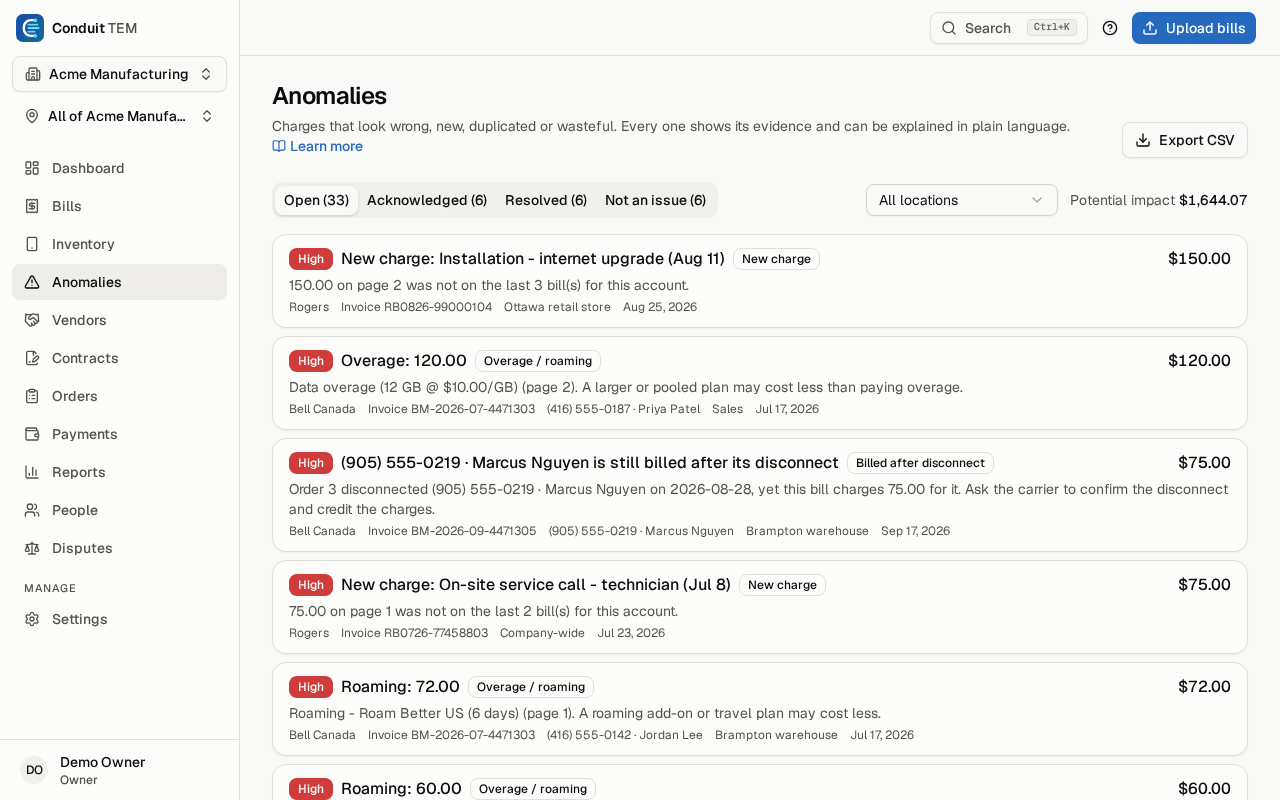
Findings
Every charge that looks wrong, with its evidence
Each finding says what it found, where on the bill, and what it costs. Conduit AI can explain it in plain language.
- New, duplicate, one-time, late and third-party charges
- Overage, roaming and lines nobody uses
- Lines billed above their contract rate
- Lines still billed after a disconnect, or after someone leaves
Built to be trusted
Your bills and your people, handled carefully
Canadian
Built in Canada for Canadian carriers' bills, in English and French. Conduit TEM runs in Toronto.
Invitation-only accounts
Nobody can sign up uninvited. Your administrators decide who gets in, and what each person can see.
Two-step verification
Authenticator-app codes protect every sign-in, required for every organization.
Encrypted offsite backups
Your data is backed up every day, with an encrypted copy kept away from the servers it runs on.
FAQ
Telecom expense management, answered
- What is telecom expense management (TEM)?
- Telecom expense management is the work of reading carrier bills, keeping an inventory of every line, circuit and service you pay for, catching billing errors and getting credits back through disputes. Conduit TEM does this with Conduit AI reading your bills and fifteen checks running on every posted bill.
- Which Canadian carriers does Conduit TEM work with?
- Conduit AI reads PDF bills and photos of paper bills from any carrier. Conduit TEM also reads CSV and Excel exports from the Bell, Rogers and TELUS business portals directly, and its help centre has setup notes for Bell, Rogers, TELUS, Fido, Virgin Plus, Freedom Mobile, Videotron, Cogeco and Shaw.
- How do bills get into Conduit TEM?
- Forward them to your organization's bill inbox, have your carrier email them there, or upload them. PDFs, photos of paper bills and carrier portal spreadsheets are all accepted, and a bill is usually read in under two minutes.
- What billing errors does Conduit TEM catch?
- New, duplicate, one-time, late and third-party charges; overage and roaming; lines nobody uses; lines billed above their contract rate; and lines still billed after a disconnect or after someone leaves. Each finding shows its evidence and what it costs.
- Can Conduit TEM read bills in French?
- Yes. Bills printed in French by Canadian carriers are shown in English, with the carrier's own wording one click away.
- Does Conduit TEM work with QuickBooks or Xero?
- Yes. Bill lines are coded to your chart of accounts with rules, and coded bills download as an import file for QuickBooks Online or Xero, with locations as a Xero tracking category.
- Can I ask Conduit AI about my bills?
- Yes. Ask Conduit AI is a chat on every page of Conduit TEM. It answers help questions, account questions and questions about your bills, lines, findings, contracts and spend in plain language, with links to the records it used. It can prepare small changes, such as starting a dispute, but nothing changes until you confirm.
- Can Conduit TEM track what we spend on AI tools?
- Yes, on the Business plan. AI spend puts AI tool seats and API usage beside your telecom spend, from live connections, uploaded exports or the vendors' bills, and counts each month once. It flags idle seats, seats for people who left, people with seats in two tools and API spend spikes.
- Where is my data kept?
- Conduit TEM is built in Canada and runs in Toronto. Data is backed up every day with an encrypted copy kept offsite, accounts are invitation-only, and two-step verification is required for every organization.
- Can I try Conduit TEM before buying?
- Yes. The free bill check reads one of your bills and shows what Conduit TEM finds, with no account needed. There is also a Free plan for small offices, and existing clients get Conduit TEM at no charge.
See what we'd find on your bill. Free.
Upload one carrier bill. Conduit AI reads it, Conduit TEM's checks go over every charge, and we email you a link to what we found. No account needed.